SCREEN TIME, ON YOUR TERMS

How to stop scrolling

Scrolling does not stop because you decided it should. It stops when the reach costs something, when the trigger is gone, or when the same minute has a better job. This page covers why the usual advice fails, what holds up instead, and how to set it up on an iPhone in about ten minutes.

Written by the developer of Handover, an iOS app built for this problem. Last revised August 2026.
Download Handover on the App Store
01

Why the usual advice to stop doomscrolling fails

Almost every tip assumes a moment of choice. Be more mindful, set an intention, notice the urge. The problem is that the pickup happens before the noticing does: the hand moves in a gap, and awareness arrives two or three screens later. Advice aimed at a decision cannot work on a behaviour that contains no decision.

The second failure is free removal. Any limit you can dismiss in one tap costs nothing to dismiss, so it stops mattering within days. That is the whole reason iPhone Screen Time limits go decorative: the notification arrives, you press Ignore Limit, and the price of that press is zero.

What people tryWhy it appealsWhere it breaks
Willpower and resolutionsFree, immediateNeeds a decision point the behaviour does not have
Deleting the appFeels decisiveThe reflex moves to the nearest substitute, reinstalled within a week
Screen Time limitsBuilt in, no extra appOne tap to ignore, and the tap is free
Greyscale and notification purgesGenuinely reduce pullGet reversed on the first inconvenient day
Total bansSimple to stateBroken once, then abandoned entirely
The test for any method Does it still work on the day you do not feel like it? If the answer is no, it is not a method, it is a mood.
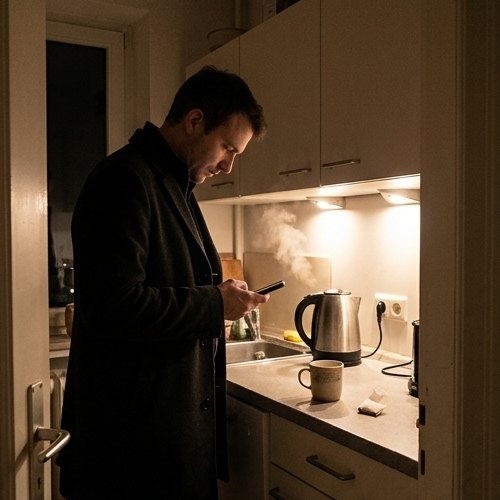
Absent-minded phone checking in the kitchen while the kettle boils
FIGURE 1. The pickup happens in a gap and the tea goes cold. Advice aimed at a decision has nothing to act on.
02

Three things that actually reduce scrolling

1. Friction, and it has to cost something

Any delay between the reach and the reward reduces the behaviour, and it does not need to be large. A few seconds of waiting, an extra step, a screen that will not open until something else happens. What friction cannot survive is being free to remove. The cost is the active ingredient, not the delay.

2. Substitution, because the gap still needs filling

The minute you took back is still empty, and an empty minute is what the reach was answering. Something has to occupy it, ideally with your hands: a book in the same pocket, an instrument in the same room, food that needs cooking. A plan that only subtracts leaves a hole the phone will fill again by Thursday.

3. Environment over intention

Rules attached to places and times hold better than rules attached to intentions. One room, one table, one hour. The charger in the hallway rather than beside the bed. These work because they need nothing from you at the moment of temptation, which is precisely the moment you have nothing to give.

Friends playing cards at a kitchen table with no phones out
FIGURE 2. Substitution in practice. The minute you took back still needs filling, ideally with your hands.
Narrow beats total A rule covering your two worst apps in your worst hour will still be running next month. A rule covering everything all day will be off by Friday.
03

How to set it up on an iPhone in ten minutes

Step one, find the hour. Open Settings, then Screen Time, and look at the daily graph rather than the total. You are looking for the hour with the most pickups, not the most minutes. For most people it is the hour before sleep or the first hour after waking.

Step two, name the two apps that own it. Not all of them. Two. Everything else stays untouched, which is what makes the change survivable.

Step three, put those two behind a real cost. Apple's own limits are worth trying first because they are free, and for some people the extra tap is enough. If Ignore Limit becomes automatic within a week, the limit is not working and no amount of resetting it will change that. That is the point at which a blocker with a price attached is the honest next step, whether that is Handover or anything else that cannot be waved away for free. The Opal Alternative page compares what the paid apps actually cost and where they differ.

Step four, decide what fills the hour. Write down the replacement before you arm anything. If you cannot name it, the rule will hold for three evenings and then be deleted on the fourth.

Step five, leave it alone for two weeks. Adding four rules on the first night is the commonest way to end up with none. One rule, one hour, two weeks, then add the next.

Measure pickups, not hours Total screen time is a weak predictor of harm. Unplanned pickups are the number that tracks how much of the day the phone is taking without being asked.
Setting up app blocker rules at a kitchen table with a notebook
FIGURE 3. Ten minutes, on paper first. Name the hour and the two apps that own it before arming anything.
04

Common questions

How do I stop doomscrolling at night?

Move the charger out of the bedroom and put the two apps you reach for behind a rule that runs from an hour before bed. The charger move matters more than it sounds: it removes the phone from arm's reach at exactly the hour when your judgement is worst.

Why do Screen Time limits stop working?

Because Ignore Limit is free. A limit only holds while dismissing it costs something you would rather keep.

Does deleting the app work?

Usually not for long. The reflex is not attached to one app, so the time moves to whatever is nearest, and the app tends to come back within a fortnight.

How long before it feels normal?

Give it two weeks. The first three evenings are the loudest, then the hour starts filling itself with whatever you put in its way.

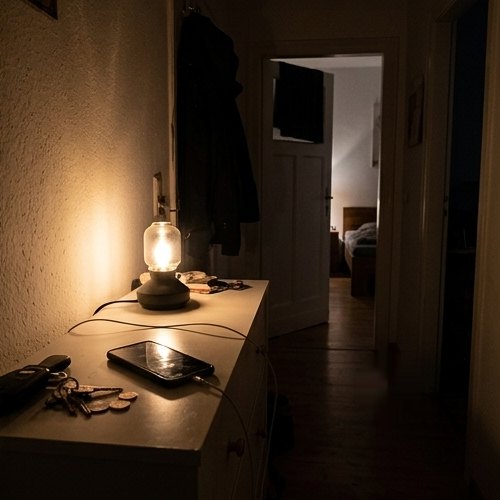
A phone charging in the hallway overnight instead of beside the bed
FIGURE 4. The charger in the hallway does more for the last hour of the day than any resolution about it.
If nothing holds If several honest attempts have failed and the use is costing you sleep, work or people, that is worth raising with a GP rather than another app. Compulsive use travels with low mood and poor sleep in both directions.

Put a price on the reach

Handover blocks the apps you choose and keeps a way back in that costs you something: a set of repetitions, a step goal, a barcode you left in another room, or days off the streak you have built. Five rules free, no card required.

Download Handover on the App Store
Free tier: five rules, no card required
Privacy: no screen time data leaves the device
Requires: iOS 16.1 or later