Handover blocks apps three different ways, and the difference between them is what
the block is attached to: a place, a session, or a window of the week. This page shows each one as
it is built in the app, what it does once armed, and what to put in the gap it leaves.
Written by the developer of Handover, an iOS app built for this problem.
Last revised August 2026.
01
What an app blocker has to get right, and why Screen Time limits stop working
Blocks in Handover are enforced through Apple's Screen Time framework, not by anything
running in the foreground. That matters for one reason: the rule holds with Handover closed,
after a restart, and while the phone is offline. A blocker that only works while its own app
is awake is a reminder, not a block.
Every rule also keeps a way back in, on purpose. Anything that locks a person out of
their own phone gets deleted inside a week, so the exit stays open and is priced instead.
Break Glass opens one rule after a five minute wait and costs five minutes off your streak.
The Emergency Coupon opens everything for an hour and costs twelve days. Calls, messages,
maps and the camera are never restricted.
Setting up any rule follows the same four steps. Name it, put apps in it, choose what the
block is attached to, then press HANDOVER to arm it.
Where the apps come from
The row marked "your distractions" is built from the apps you have already picked out, so a
new rule is usually two taps of a plus button rather than a hunt through a list.
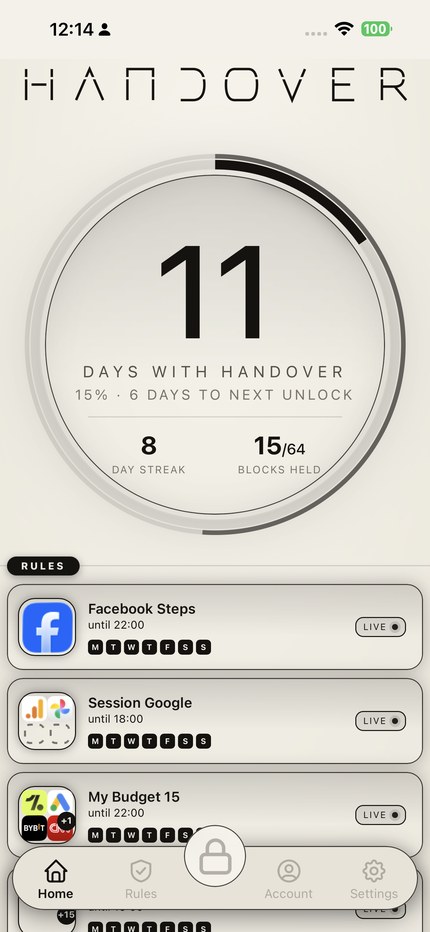
FIGURE 1. The home screen. Days with Handover, the streak, blocks held, and every armed rule with the hour it runs until.
02
Rule one: block apps by location
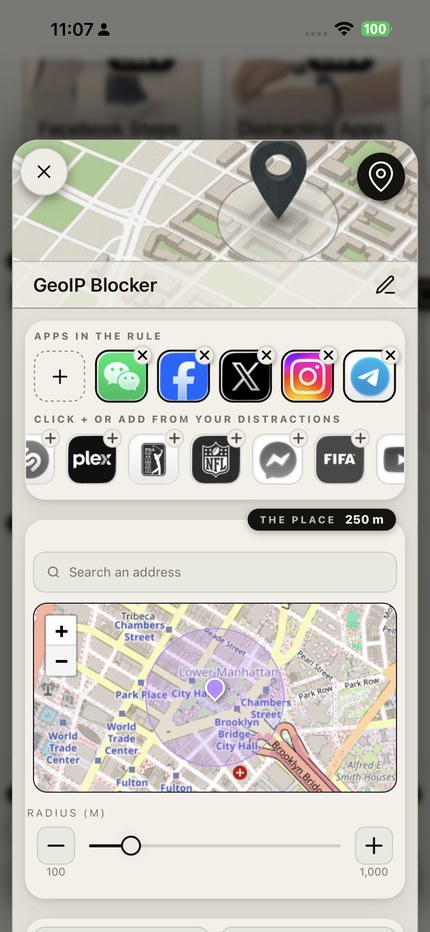
How to set it up. Create a rule and pick the place type, marked by the pin in the
top right corner. Rename it with the pencil, here it is called GeoIP Blocker. Add the apps
you want shut: tap the dashed plus to choose from everything installed, or tap the small
plus on any icon in the distractions row underneath. Then find the location, either by
typing an address into the search field or by moving the map, and set how far the rule
reaches with the radius slider, anywhere between 100 and 1,000 metres. Press HANDOVER.
What it does. While the phone is inside that circle, those apps do not open.
Step outside it and they work normally. Nothing is scheduled and nothing counts down,
the rule simply follows the ground you are standing on.
What it is for. Places where you already know how the evening goes. The office desk,
the lecture theatre, the gym, your own kitchen. A place rule is the least negotiable kind
because it needs no decision from you at all: arriving is the trigger.
Radius, not address
250 metres covers a building and its street. A wider circle catches the walk in as well,
which is usually where the reach happens.
FIGURE 2. The place rule. Apps at the top, address search and radius below, 100 to 1,000 metres.
03
Rule two: limit apps to timed sessions
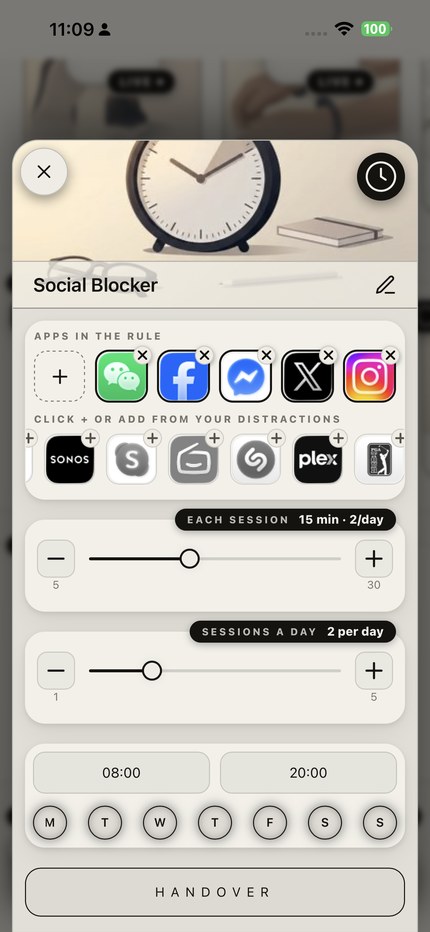
How to set it up. Pick the session type, the clock icon. Add the apps, here the
social set. Set how long one sitting lasts with the first slider, from 5 to 30 minutes, and
how many sittings the day gets with the second, from 1 to 5. The example allows 15 minutes,
twice a day. Then set the hours the rule is awake, 08:00 to 20:00, and tap the days it runs.
Press HANDOVER.
What it does. Inside the active hours the apps are shut until you start a session.
When the session ends they close again, and once the day's sessions are used up they stay
closed until tomorrow. The allowance does not roll over.
What it is for. Apps you genuinely use and do not want to lose, which is most of
them. A session rule keeps the app and removes the drift, because the cost lands at the point
where you would otherwise open it for the ninth time.
Two short beats one long
Two fifteen minute sessions are easier to keep than one thirty minute session, and they
leave less room for the sitting to become the evening.
FIGURE 3. The session rule. Fifteen minutes a sitting, two sittings a day, awake from 08:00 to 20:00.
04
Rule three: block apps at certain times
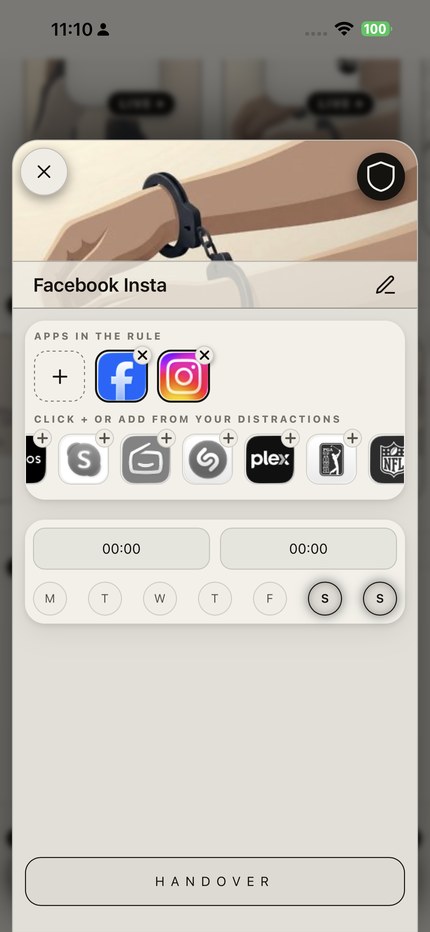
How to set it up. Pick the strict type, the shield. Add the apps, here just
Facebook and Instagram. Set the start and end time, and tap the days you want it on. The
example runs 00:00 to 00:00, which is the whole day, on Saturday and Sunday only. Press
HANDOVER.
What it does. Those apps are gone for that window on those days, with no session
to start and no allowance to spend. The shield marks the rule as strict, so the ordinary
exit is not available and the Emergency Coupon is what remains, at the price of twelve
streak days.
What it is for. A boundary you have already decided on and do not want to
re-decide every week. Weekends, evenings after a set hour, the first hour after waking.
Keep it narrow. A rule that covers everything gets broken once and then abandoned, while a
rule that covers one clearly defined stretch survives.
Narrow beats total
Two days is a rule. Every day at every hour is a wall, and walls come off the phone inside
a week.
FIGURE 4. The window rule. Facebook and Instagram, all day, Saturday and Sunday, marked strict by the shield.
05
What to put in the gap
A block creates an empty minute, and an empty minute is what the reach was answering in
the first place. The four habits below are the ones that hold up, and each works because it
occupies the same slot the phone was occupying rather than asking you to want it less.
Give your hands the job
The reach is physical before it is anything else, so the cheapest counter is a task that
needs both hands. Cooking, an instrument, repairs, a pen. Do it in the same window your rule
covers and the block stops feeling like a subtraction. Put the phone in another room while
you do it: measured cognitive capacity is higher with the phone out of sight than with it
face down beside you.
FIGURE 5. Both hands occupied, phone in another room. The simplest substitution on the list.
Make the table a phone-free place
Shared meals are the highest value hour to protect and the easiest to lose, because one
phone on the table gives everyone else permission. Agree that both phones go away, or set a
place rule on the kitchen and let the software hold the line instead of one person having to
police it. Conversation is the substitute here, and it is a better one than anything a feed
offers.
FIGURE 6. One phone on the table gives the other person permission. Neither, or a rule on the room.
Price the way back in with movement
If the apps have to open, make the opening cost something physical. Handover can hold a
rule behind repetitions counted by the phone's own sensors, or a step goal that cannot be
completed sitting down. The point is not fitness. It is that a reflex which now requires
forty squats stops being a reflex, because it has become a decision with a price attached.
FIGURE 7. Effort as the price of the unlock. A reflex that costs forty squats is no longer a reflex.
Leave a better default within reach
Whatever is nearest wins. A book on the arm of the chair, a paperback in the same pocket
the phone lives in, a charger in the hallway rather than beside the bed. This is the smallest
change on the list and the one most likely to still be in place a month later, because it
asks for nothing at the moment of temptation. It just changes what your hand finds.
FIGURE 8. Whatever is nearest wins, so change what is nearest. The cheapest habit to keep.
None of these require you to be strong-willed at 11pm. That is the whole test. If a plan
only works on the days you feel like it, it is not a plan, it is a mood.
One at a time
Pick the single rule that covers your worst hour and run it for a fortnight before adding a
second. Four rules armed on the first evening is the commonest way to end up with none.
Set your first rule tonight
Handover is free for five rules, with no card required. Blocks are enforced by Apple's
Screen Time framework, and no screen time data leaves the device.
Free tier: five rules, no card required Privacy: no screen time data leaves the device Requires: iOS 16.1 or later